

Settings reference
Dieser Inhalt ist noch nicht in deiner Sprache verfügbar.
One deployment serves one person or one team. Each user signs in, connects their own calendars and makes their own choices. Nobody sees the calendars of another user.
Variables and secrets
Section titled “Variables and secrets”Set variables in the Cloudflare dashboard: Workers & Pages, your Worker, Settings,
Variables and Secrets. wrangler.jsonc does not list them, and it sets keep_vars, so a deploy
keeps the values you set there. For local development, put them in .dev.vars. Set secrets with
wrangler secret put <NAME>.
If you add a vars entry to wrangler.jsonc, that value replaces the dashboard value on every
deploy, even an empty one. Use either the dashboard or the file for one name, not both.
Until at least one of ALLOWED_EMAILS, ALLOWED_DOMAINS or ADMIN_EMAILS is set, and the
secrets and a sign-in provider are present, every page shows a checklist of what is missing.
| Name | Kind | Purpose |
|---|---|---|
ALLOWED_EMAILS |
variable | Comma-separated addresses that may sign in. For a personal deployment, your own address. |
ALLOWED_DOMAINS |
variable | Comma-separated email domains whose users may sign in, e.g. example.com. For a team. |
ALLOWED_TENANT_IDS |
variable | Recommended. Entra tenant IDs. Microsoft sign-ins from other tenants are refused. |
ADMIN_EMAILS |
variable | Addresses with access to the admin page (users and account counts, no calendar data). |
ORG_NAME |
variable | Optional display name. |
TIME_ZONE |
variable | IANA time zone for dates in the dashboard, e.g. Europe/Vienna. Default UTC. |
PRIVACY_CONTACT |
variable | Address shown on the /privacy page as the contact of the operator. |
OPERATOR_NOTICE |
variable | Optional. Text on /privacy and before users connect an account. See below. |
SIGN_IN_PROVIDERS |
variable | Optional. microsoft, google or microsoft,google. Limits sign-in. Accounts stay open. |
PUBLIC_URL |
variable | Optional. The https address of this deployment. Turns on push notifications. |
DATA_JURISDICTION |
variable | Optional. eu keeps the Durable Objects in the EU. Set it before the first account connects. |
MAX_DETAIL_TO_EXTERNAL |
variable | Optional cap from org accounts to other accounts: busy, title, title_location. |
MAX_DETAIL_FROM_EXTERNAL |
variable | Optional cap from other accounts to org accounts. Same values. |
SESSION_SECRET |
secret | At least 32 characters. Signs the session cookie. openssl rand -base64 48 |
TOKEN_ENCRYPTION_KEY |
secret | Base64-encoded 32-byte key for AES-GCM token encryption. openssl rand -base64 32 |
MICROSOFT_CLIENT_ID / _SECRET |
secret | Entra app registration. Leave empty if you do not use Microsoft 365. |
GOOGLE_CLIENT_ID / _SECRET |
secret | Google OAuth client. Leave empty if you do not use Google Calendar. |
ALERT_WEBHOOK_URL |
secret | Optional. Incoming webhook for operator alerts. See Alerts. |
HEARTBEAT_URL |
secret | Optional. Outside monitor that hears a GET once an hour. See below. |
MCP_ENABLED |
variable | Optional. 1 turns on the read-only MCP server and API tokens. |
MCP_EVENTS_ENABLED |
variable | Optional. 1 offers the MCP tool list_events. |
If you remove someone from these settings, their access ends at their next request. Sessions last 12 hours. Signing in again is one click with the provider.
OPERATOR_NOTICE is plain text: who runs this deployment and what the operator can see. Users see
it on /privacy and before they connect an account. HTML shows as text. Text past 600 characters is
cut off. If it is empty, nothing is shown.
Alerts
Section titled “Alerts”If you set the secret ALERT_WEBHOOK_URL, slotmirror posts {"text": "..."} to that address. This
is the format of Slack incoming webhooks; Google Chat and Mattermost accept it too. Microsoft Teams
needs its own card format, so use a Teams workflow that takes the text field. The URL must start
with https://. Without the secret, slotmirror sends nothing and reports no error.
Alerts need a running Worker. To learn when it stops, set the secret HEARTBEAT_URL to the URL of
an outside monitor such as healthchecks.io. The cron calls it with a plain GET once an hour, without
any data, and the monitor alerts when the calls stop. Set the monitor’s period to 1 hour and its
grace time to 3 hours. The call needs a free subrequest, so it stops above about 44 accounts.
healthchecks.io can take both secrets from one check. Set HEARTBEAT_URL to the ping URL and
ALERT_WEBHOOK_URL to the ping URL plus /fail. An alert then shows up as a failure with the text
as its ping body, and goes to the check’s integrations, such as e-mail or Discord. The next heartbeat
marks the check as up again, so an alert does not stay visible in the check.
To try the webhook, use Send test alert on the admin page. Only admins see it, it works once per minute, and a failed try also counts. The page shows the result, never the URL. The activity log records each try that goes to the webhook. A refused request within the minute leaves no entry.
| Alert | When | Repeat |
|---|---|---|
| Needs reconnecting | The provider refuses an account’s refresh token. | Once for each pause |
| Silent rule | An active rule had no successful run for 3 hours. slotmirror checks every hour. | Every 6 hours per rule |
| Aborted run | A run ended without a result, for example at a platform limit. | At most every 6 hours per rule |
| Check cannot work | The hourly check cannot look at the rules. See the list below. | Every 6 hours |
| Confirmed deviation | A comparison ended with deviations that stayed after a successful run. | At most every 6 hours per calendar |
The text names the provider, rule IDs or calendar IDs, and the address of the deployment. It never names an email address, a calendar name or an event. One alert names at most 20 rules or calendars and gives the total. Others follow in a later alert. If more rules stay silent than one alert names, the rule without an alert, or with the oldest one, comes first, so every silent rule gets its turn.
A comparison alerts only for confirmed deviations. Hits that a run cleared, hits of the second scan alone and a comparison that ended without a result send nothing. The activity log and the admin page show them. In a calendar with rules, a deviation is confirmed if it stays after a successful run. In a calendar without an active rule, no run takes place, so two scans confirm it.
A result within the repeat lock waits until the lock ends, and each calendar keeps one open alert: the newest result counts. A later comparison without any hit ends an open alert if it read at least as far. The daily comparison reads only the near days, so it does not end the alert of a full comparison.
A silent rule is an active rule that should run and did not run successfully. The 3 hours count from the last successful run. A successful run is not a preview, has no failed action and leaves no work open. The alert lists rules without a run apart from rules with failed runs.
- A run with failed actions, a run that left work open and a preview do not count, so a rule that fails every time alerts too.
- A rule that is turned off does not alert.
- A rule does not alert while its source account or its target account needs reconnecting.
- A rule does not alert if its user no longer passes the access settings.
- A rule has 3 hours to run after you create it, change it or turn it on.
- A rule has 3 hours to run after you connect one of its accounts again.
The next cron tick or alarm of the account reports an aborted run, because a run that the platform stopped cannot send anything. The next run can repair the blocks by itself.
Only a 2xx answer counts as delivered. A failed post goes to the log without the URL. slotmirror
sends it again at the next cron tick of the account for a reconnect, an aborted run or a confirmed
deviation, and at the next hourly check for a silent rule. Each delivered alert about a rule appears in the activity log as “Alert sent to
the operator”.
Check limits
Section titled “Check limits”The hourly check tells you if it cannot look at the rules. It has three reasons to stop:
- The audit log holds 10,000 rows or more for the last 3 hours. No rule counts as silent then, because the rows that the check does not read can hold a rule’s run.
- A database read fails. If the database cannot tell the repeat lock either, this alert can repeat every hour.
- The access settings admit no owner of an active rule. This usually means a broken access setting. It also happens if the last owner of active rules left and remains an active user.
One check reads at most 500 rules. With more rules, each hourly check reads the next 500. A silent rule can then wait some hours longer for its alert.
All alerts depend on the cron. If the cron itself does not run, for example because the Worker is down or its trigger is gone, no alert arrives. Use an outside uptime check for that case.
Settings for all mirrorings
Section titled “Settings for all mirrorings”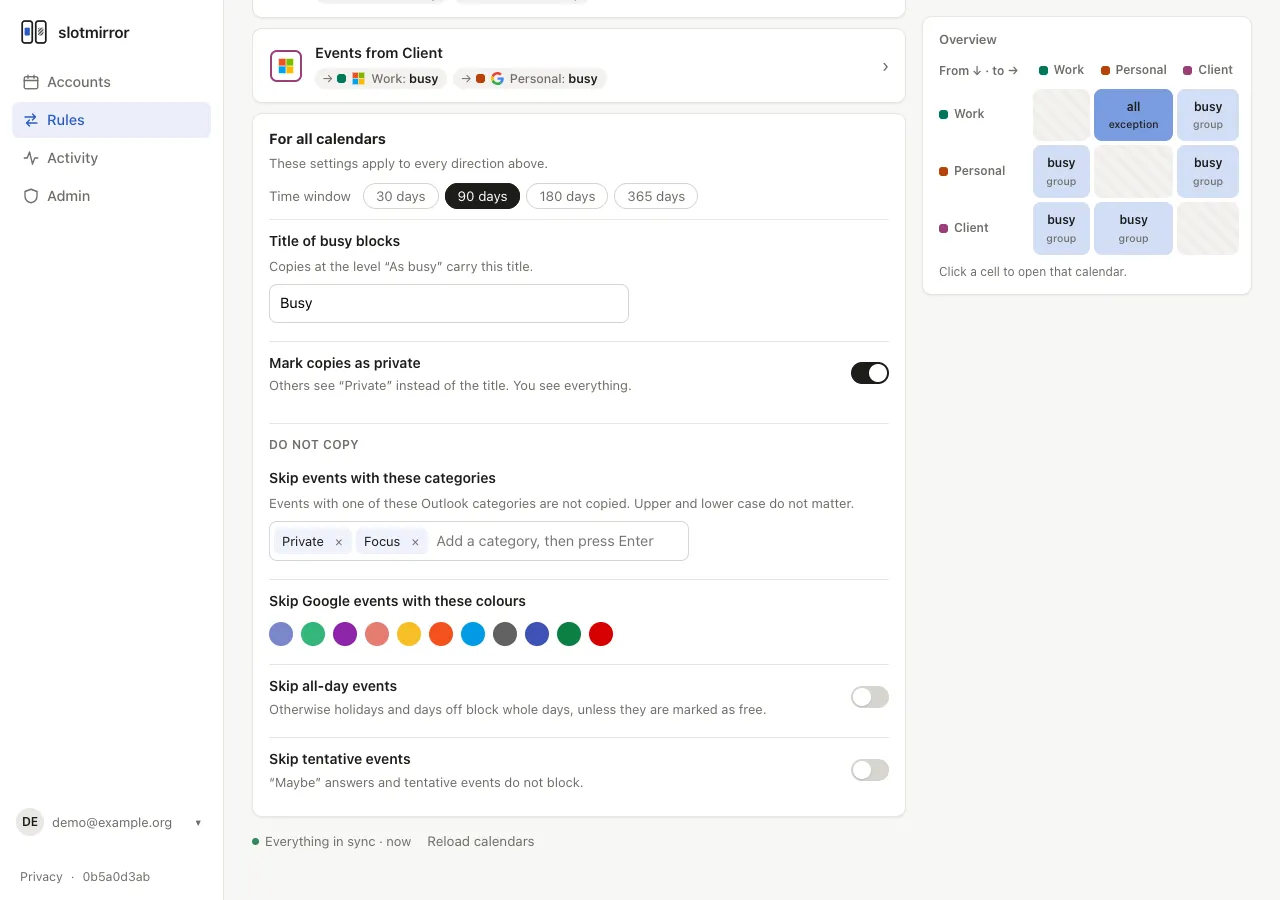
Each user sets these on the Mirroring page. Choose For all mirrorings in the header. They apply to every mirroring.
| Setting | Effect |
|---|---|
| How far ahead | How many days ahead the sync looks. Events up to this many days from today are copied. |
| Title of busy copies | The title of copies at the level Busy only. Leave it empty for “Busy”. |
| Skip all-day events | Off by default. If on, holidays and days off do not block the whole day in the others. |
| Skip tentative events | Invitations answered with “maybe”, and events marked tentative, do not block. |
| What others see, by default | Private event: people who can see your calendar see a private event, or “Busy” in Google Calendar, instead of the title. You see everything. The choice applies to mirrorings you turn on later. Existing mirrorings keep their own choice, unless you also tick Also apply to N existing mirrorings (shown when there are any). |
| Skip events with these categories | Outlook category names, separated by commas, for example Private, Focus. |
| Skip Google events with these colours | Google event colours to leave out. |
Events marked private in the source never carry more than “Busy”.
Copy only some categories
Section titled “Copy only some categories”A mirroring can copy only part of its source. Open the mirroring on the Mirroring page, and fill Only these categories (for an Outlook source) or Only these colours (for a Google source) under Limits. The list applies to that mirroring only. The skip settings under For all mirrorings stay as they are.
The list is empty by default, and then every event is copied. If the list has entries, an event needs at least one of them. An event without a category is not copied.
- If the source is an Outlook account, the list holds category names. Upper and lower case do not matter, and spaces around a name do not count.
- If the source is a Google account, the list holds colours, because Google events have no categories. A Google event in the default colour of its calendar has no colour of its own, so no colour in the list matches it.
- If an event matches this list and an exclusion, it is not copied.
- If an event leaves the list, the next sync removes its block. If it comes back, the next sync writes the block again. Each occurrence of a recurring event counts on its own.
- A block that ended before the sync window stays, as with the other filters.